Download Here: https://chromewebstore.google.com/detail/netsuite-transaction-visu/abibdamiknacibalolgokdnlajomodjo
Ever clicked through five different NetSuite records just to understand how a single sales order turned into an invoice, a payment, and a deposit? You are definitely not alone.
Navigating transaction relationships in NetSuite has historically meant jumping between records, mentally piecing together the document flow, and hoping you didn’t miss a credit memo or return authorization along the way. It is time-consuming and leaves room for error.
That is exactly why we built the NetSuite Transaction Visualizer, a completely free Chrome extension from swyfterp.com/ This tool displays an interactive document flow diagram directly on every transaction record in NetSuite. No more guesswork. No more tab juggling. Just open any transaction and instantly see the full picture.

What Does the NetSuite Transaction Visualizer Do?
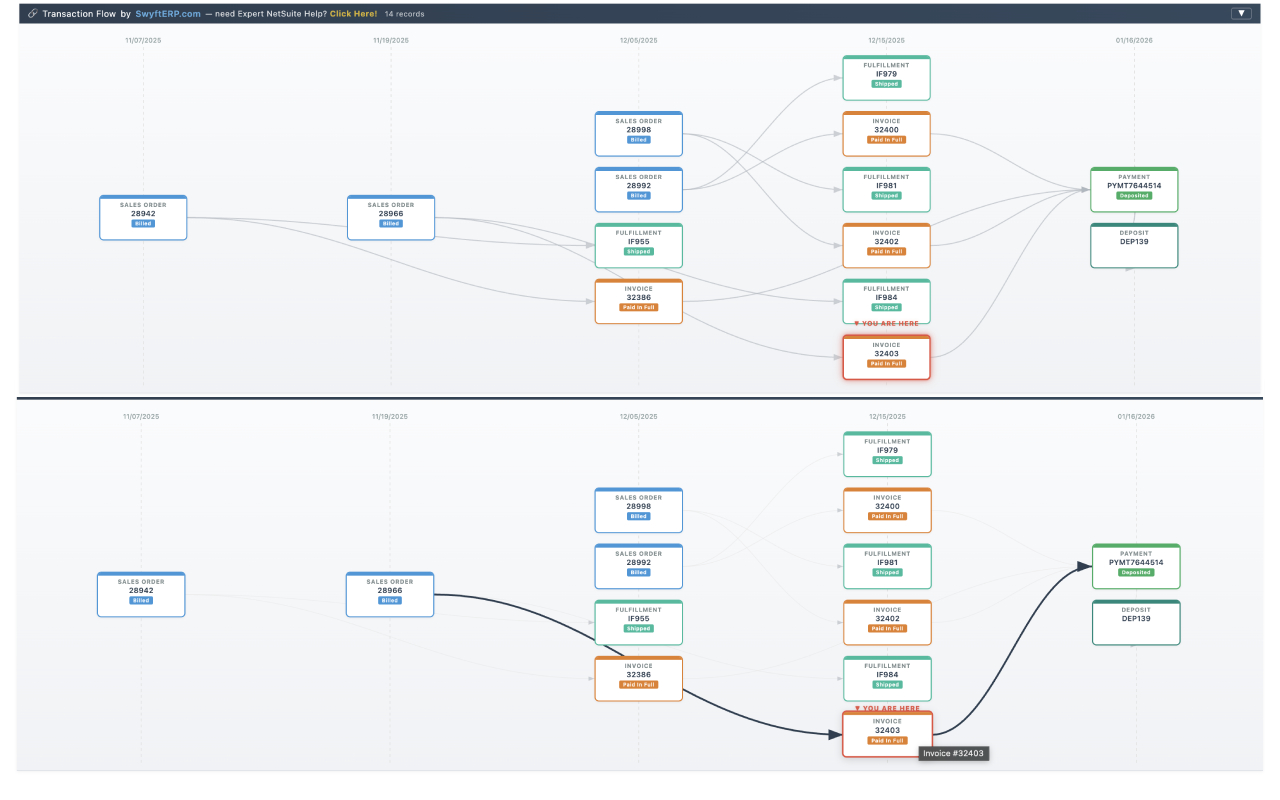
When you navigate to any transaction record in NetSuite, the extension automatically renders a left-to-right flow diagram at the top of the page. This diagram maps out every related transaction in the chain, from the originating quote or sales order, all the way through fulfillments, invoices, payments, deposits, credit memos, and refunds.
Here is a simplified example of what you will see:
▼ YOU ARE HERE
[Quote] → [Sales Order] → [ INVOICE ] → [Payment] → [Deposit]
The current record you are viewing is highlighted with a red border and a “YOU ARE HERE” indicator, so you always know exactly where you stand in the transaction lifecycle.
Key Features of the Extension
1. Automatic Document Flow Detection
There is nothing to click or configure each time you open a record. The extension detects when you are on a NetSuite transaction page and loads the diagram automatically.
2. Full-Chain Visualization
The extension traces both upstream and downstream from your current record. It follows PreviousTransactionLink and NextTransactionLink tables recursively up to 5 levels deep (configurable up to 10). Whether you start on an invoice to find the originating sales order, or trace a payment back to a quote, the full chain is instantly visible.
3. Color-Coded Record Types
Each record type is assigned a distinct color so you can scan the diagram at a glance:
| Record Type | Color |
| Quote / Estimate | Purple |
| Sales Order | Blue |
| Item Fulfillment | Teal |
| Invoice | Orange |
| Customer Payment | Green |
| Customer Deposit | Light Green |
| Credit Memo | Red |
| Customer Refund | Dark Red |
| Purchase Order | Dark Blue |
| Vendor Bill | Dark Purple |
| Vendor Payment | Dark Teal |
| Return Authorization | Dark Orange |
| Journal Entry | Brown |
| Deposit | Teal |
4. Interactive & Draggable Layout
- Status Badges: Each node displays the current status of that transaction (Open, Paid In Full, Billed, Deposited), allowing you to spot bottlenecks without opening additional tabs.
- Clickable Nodes: Click any transaction node to navigate directly to that record.
- Draggable Nodes: Need a clearer view? Drag any node to reposition it; the connecting arrows update in real time.
- Hover Highlighting: Hover over any node to highlight its direct connections and dim unrelated edges.
- Collapsible Banner: The diagram collapses with one click and remembers your preference.
5. Zero Deployment Required
Because this is a Chrome extension and not a custom SuiteScript, there is nothing to deploy in your NetSuite account. The extension use the N/query module already loaded on standard NetSuite pages, running lightweight SuiteQL queries to fetch relationship data. Your NetSuite account remains completely untouched.
Who Benefits from This Free NetSuite Tool?
- NetSuite Administrators who need to troubleshoot transaction issues and understand the full document flow without manual tracing.
- Accounting & Finance Teams who want to quickly verify that an invoice is paid, a payment is deposited, or a credit memo is applied correctly.
- Operations & Warehouse Staff who need to confirm that a sales order has been fulfilled and invoiced, or a purchase order received and billed.
- Auditors & Controllers tracing transaction chains for reconciliation, month-end close, or compliance reviews.
- NetSuite Consultants & Developers who need to quickly grasp client transaction relationships during implementations or debugging sessions.
How to Install the Extension
Installation takes less than 30 seconds:
- Download the extension files from the chrome web store here: https://chromewebstore.google.com/detail/netsuite-transaction-visu/abibdamiknacibalolgokdnlajomodjo
- You are done. Navigate to any NetSuite transaction record and watch the flow diagram appear.
- Optionally turn this off by clicking on the extension icon (may be under the jigsaw puzzle piece in your chrome toolbar toggle it off.
Note on Permissions: The extension requires minimal permissions (activeTab, storage, and host access limited strictly to *.app.netsuite.com). It does not access other websites or send data outside your browser.
Configuring Your Visualizer
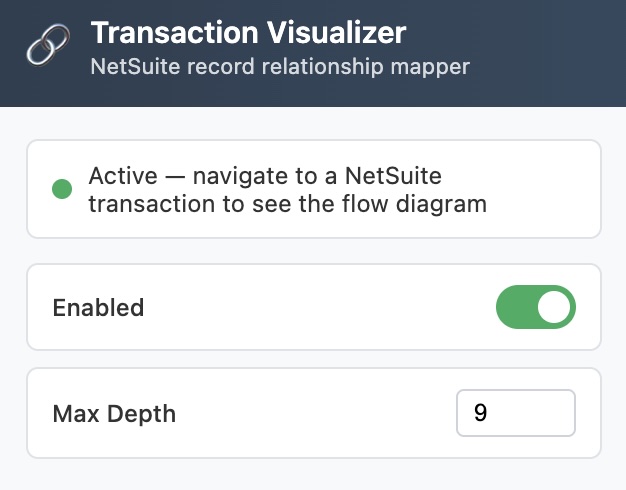
Click the extension icon in your Chrome toolbar to customize your experience:
| Setting | Default | Description |
| Enabled | On | Toggle the visualizer on or off globally. |
| Max Depth | 5 | Set how many levels deep to trace the chain (1 to 10). |
Pro tip: Lower max depths mean faster load times. The default of 5 is perfect for most workflows, but you can bump it to 10 for complex, multi-level flows (like blanket POs with dozens of receipts).
Supported NetSuite Transaction Types
The extension supports standard NetSuite transaction types, including Estimates, Sales Orders, Fulfillments, Invoices, Payments, Deposits, Credit Memos, Refunds, Purchase Orders, Receipts, Vendor Bills/Payments, Return Authorizations, Journal Entries, Work Orders, and more.
(Note: Any custom or unlisted transaction type is handled gracefully with a neutral gray color, displaying the type name clearly on the node.)
Free and Built for You
The NetSuite Transaction Visualizer is completely free. We built this at swyfterp.com/ because we believe basic transaction visibility shouldn't require an expensive paid add-on or a complex SuiteScript deployment. If it saves you even five minutes a day, it has done its job.
Need Deeper NetSuite Expertise?
If your team needs more than a Chrome extension: whether that is custom SuiteScript development, workflow automation, advanced reporting, API integrations, or full implementation support. That is exactly what we do. We are a team of NetSuite professionals who live in this platform every day.
Click here to Book a meeting with us today to learn how we provide NetSuite Best Practices.
Getting usable visibility out of NetSuite is usually a reporting build, not a data problem. See NetSuite Reporting.