
Every month, the same cycle repeats: your team pulls data from multiple sources, calculates line items, builds invoices, routes them for approval, and sends them out to customers. It works, until it doesn’t. Until someone misses a rate change. Until an invoice goes out without approval. Until your team spends the first week of every month buried in spreadsheets doing work that your ERP should be handling for them.
What if NetSuite could do most of that automatically?
At Swyft ERP, we’ve built custom bulk invoicing solutions for multiple clients, processing hundreds of thousands of records per month to generate thousands of invoices with the exact right amounts, the right approvals, and the right delivery. No spreadsheets. No manual copying. No crossed fingers.
In this post, we’ll walk through how it works: what NetSuite offers out of the box (and the hidden risks of setting it up wrong), where custom development takes over, and what a real-world automated invoicing process looks like from start to finish.
What NetSuite Offers Out of the Box (And Why “Native” Still Needs an Expert)
Before we dive into custom solutions, it’s worth noting that NetSuite does come with built-in functionality for basic invoicing automation. However, a common and costly misconception is that “out-of-the-box” means “plug-and-play”, but Oracle sells you the vision of what “could be” and it’s up to you to set it up correctly.
Even native features require precise, expert configuration. Here is what NetSuite offers, and where DIY setups usually go wrong:
- Approval Workflows (SuiteFlow): NetSuite’s native workflow engine allows you to set up approval routing.
- The Risk: For straightforward “submit-to-manager” scenarios, this works. But a poorly configured SuiteFlow can silently trap thousands of invoices in an endless loop or a routing black hole. If the logic breaks, your invoices don’t go out, and your cash flow grinds to a halt.
- The Risk: For straightforward “submit-to-manager” scenarios, this works. But a poorly configured SuiteFlow can silently trap thousands of invoices in an endless loop or a routing black hole. If the logic breaks, your invoices don’t go out, and your cash flow grinds to a halt.
- Email Automation: NetSuite can automatically email invoices to customers upon creation or approval.
- The Risk: If your customer contact hierarchies and billing preferences aren’t mapped perfectly, the system will execute flawed instructions flawlessly. Sending sensitive financial data to the wrong contact (or worse, the wrong company entirely) isn’t just embarrassing; it’s a massive compliance liability that can permanently damage client trust.
- The Risk: If your customer contact hierarchies and billing preferences aren’t mapped perfectly, the system will execute flawed instructions flawlessly. Sending sensitive financial data to the wrong contact (or worse, the wrong company entirely) isn’t just embarrassing; it’s a massive compliance liability that can permanently damage client trust.
- Bulk Invoicing from Sales Orders: NetSuite provides native tools for generating invoices in bulk from existing orders.
- The Risk: If your item pricing, tax schedules, or discounting rules aren’t strictly governed, bulk generation becomes bulk error generation. You end up spending more time issuing credit memos and apologizing to customers than you would have spent doing it manually.
For basic processes, native tools might be all you need (provided they are set up flawlessly by a NetSuite architect.) But here’s the reality for scaling businesses: most companies don’t have basic processes. If your invoicing involves variable rates, complex calculations, multi-tier approvals based on threshold amounts, or data that changes frequently, trying to force those requirements into out-of-the-box features is a recipe for disaster.
That’s where Swyft ERP comes in.
How Swyft ERP Builds Bulletproof Automated Invoicing
We’ve implemented bulletproof invoicing solutions for clients across different industries. While the details vary, the overall architecture follows a proven, secure pattern. Here’s how it breaks down:
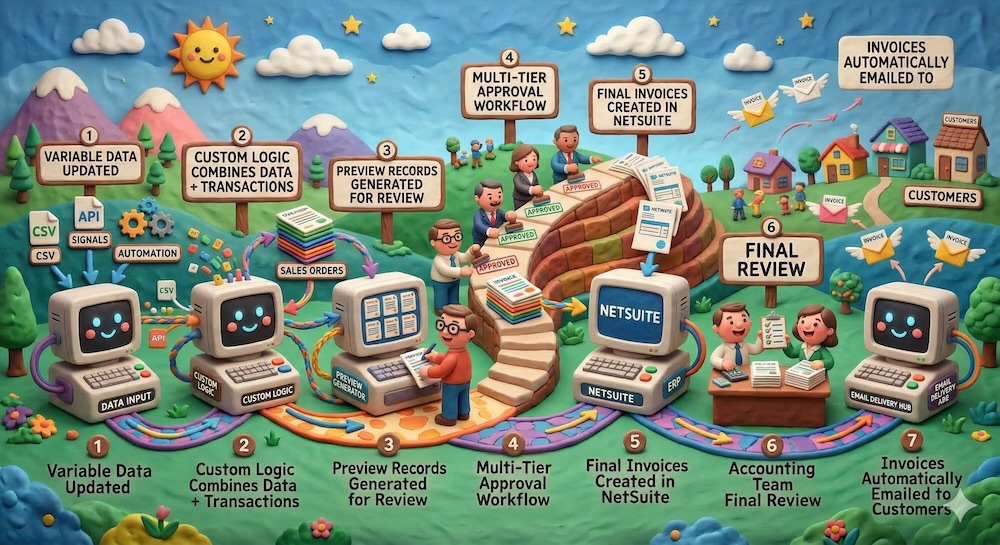
Step 1: Securely Store the Variable Data
Every complex invoicing process has data that lives outside of standard transactions, values that change over time and directly affect how invoices are calculated. Think fluctuating interest rates, regulatory tariff prices, usage-based metrics, or complex contractual rates.
We create custom records in NetSuite, essentially purpose-built tables, to store this non-transactional data. These can be updated via:
- Manual CSV import for periodic updates.
- Scheduled automations that pull data from external systems nightly.
- API integrations that keep rates synchronized in real-time.
This data lives safely inside NetSuite, right next to your accounting records. No more fragile spreadsheets.
Step 2: Generate Invoice Previews (The Safety Net)
Once the data is current, our custom logic kicks in. The system combines your transaction data, variable rates, and customer-specific billing rules to generate a set of preview records.
Why previews matter: Automation without oversight is dangerous. Previews give your team a chance to review draft invoices, catch edge cases, and make corrections before a single official invoice is created or an email is sent.
Step 3: Route Through Multi-Tier Approvals
The preview records then enter an approval workflow designed specifically for your business rules. We build logic that native tools struggle with:
- Threshold-based routing (e.g., invoices over $50k route to the CFO).
- Department or group-based approvals.
- Sequential or parallel approvals.
- Rejection and rework loops. ### Step 4: Generate Final Invoices
Once all approvals are locked in, the system generates the final, approved invoices. These are real transaction records that hit the general ledger, update accounts receivable, and flow into your financial reporting.
Step 5: Flawless Delivery to Customers
The approved invoices are automatically emailed to the correct, verified customer contacts: formatted with your branding, attached as PDFs, and logged in NetSuite for a complete audit trail. No manual exporting. No forgetting to CC the right person.
The Complete Flow at a Glance
Handling Edge Cases: Automation With Humans in the Loop
At Swyft ERP, we believe automation should reduce clicks, not eliminate oversight. For mission-critical processes like billing, the numbers must be right. That’s why every solution we build keeps the appropriate employees in the loop. Automation handles the tedious data aggregation and routing, so your team can focus on what requires human judgment. If an error is spotted, the invoice is rejected back to draft, corrected, and re-enters the flow with a full audit trail.
Beyond Invoicing: Commissions, Payments, and More
Once invoices are generated flawlessly, we can automate the downstream processes:
Automated Commission Calculations
Real-world commission structures (multiple tiers, territory splits, performance accelerators) are often too complex for NetSuite’s native commission module. If your commission logic lives in a spreadsheet today, we can map out the full logic and implement it directly in NetSuite. Commissions are calculated accurately and automatically the second an invoice is created.
Consolidating Spreadsheet Logic into NetSuite
Anything you’re currently doing in multiple Excel spreadsheets can be built directly into your NetSuite account. When that logic lives inside NetSuite, you open up real-time insight into your financial reporting. You can see revenue by customer, margin by product line, and outstanding receivables without waiting for someone to manually update a workbook.
Don’t Risk Your Revenue on a Trial-and-Error Setup
To give you a sense of scale: we process hundreds of thousands of individual records every month for our clients to produce thousands of flawless final invoices.
That volume is impossible to manage manually. But more importantly, setting up an automation of that magnitude requires deep technical expertise. A DIY approach to NetSuite automation often leads to delayed billing, lost revenue, and damaged customer relationships.
If your team is spending days manually building invoices, or if you’re terrified that your current NetSuite setup is a ticking time bomb of billing errors. There is a better way.
We’ll work with you to:
- Audit your current setup and identify high-risk configurations.
- Map your ideal invoicing process end to end.
- Design approval workflows that protect your revenue.
- Build and implement the solution directly in NetSuite.
Let’s talk about what your invoicing process looks like today, where the risks are, and how we can secure and automate it. Most initial conversations take about 30 minutes.
Schedule Your Free Consultation at Swyft ERP.com →
SwyftERP is a NetSuite consulting firm specializing in custom development, automation, and process optimization. We help companies turn manual, spreadsheet-driven workflows into streamlined, scalable solutions built directly into NetSuite. Learn more at swyfterp.com/.
We built exactly this for a Pacific Northwest agribusiness, bulk invoicing and automated statements that saved them weeks of work. See Read the case study.