Understanding your true product costs is the cornerstone of running a profitable product-based business. If you are only looking at the purchase price of your items, you are missing a critical piece of the puzzle: Landed Cost.
Landed cost encompasses all additional expenses incurred to acquire inventory and get it into your warehouse ready for sale, such as freight, customs duties, insurance, and handling fees. Accurately capitalizing these costs into your inventory valuation is essential for calculating an accurate Cost of Goods Sold (COGS) and understanding your true profit margins.
While NetSuite offers solid inventory management features out of the box, complex global supply chains often require a more tailored approach to landed cost allocation. Here is how the Swyft ERP team helps businesses automate this critical accounting process.
The Challenge: Real-World Landed Cost Complexity
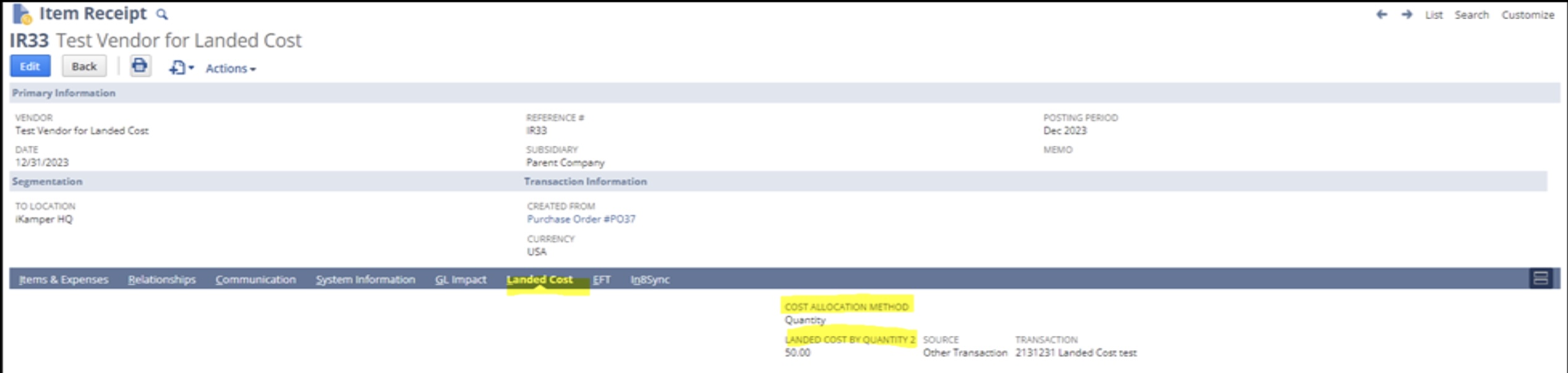
Currently, native NetSuite allows users to allocate landed costs on the Item Receipt record by selecting a single allocation method, typically based on the Cost of the item or the Quantity.
However, in standard business operations, a single shipment often incurs multiple types of landed costs, each requiring a different allocation method. For example:
- Taxes and Tariffs: Best allocated based on the Item Cost (value).
- Freight and Shipping: Best allocated based on Quantity or Weight.
- Handling Fees: Often applied as a Fixed Amount across the shipment.
When native functionality forces a “one-size-fits-all” allocation method at the receipt level, accounting and warehouse teams are forced to rely on manual spreadsheet calculations, increasing the risk of human error and delaying the month-end close.
The Swyft ERP Solution: Automated, Multi-Method Allocation
To eliminate manual data manipulation, our NetSuite development team engineered an automated solution that allows users to apply multiple allocation methods to a single item receipt simultaneously.
By enabling the native NetSuite preference for line-level allocation (Setup > Accounting > Accounting Preferences > Items & Inventory > Receiving > Landed Cost Allocation per Line), we built a custom SuiteScript architecture that does the heavy lifting for you.
Here is how it works under the hood: We introduce custom fields directly on your transaction records to capture distinct costs and their specific rules:
- Landed Cost 1 + Allocation Method 1 (e.g., Freight by Quantity)
- Landed Cost 2 + Allocation Method 2 (e.g., Tariffs by Item Cost)
- Landed Cost 3 + Allocation Method 3 (e.g., Handling as Fixed Amount)
Once entered, our backend script automatically computes the exact proportional cost for every single item on the receipt and pushes the precise financial data to the line level.
Why Automate Your Landed Costs?
By leveraging Swyft ERP’s automated landed cost script, businesses immediately open up several critical advantages:
- True Margin Visibility: Revalue your inventory with pinpoint accuracy so your executive team knows exactly what your profit margins are.
- Maximized Efficiency: Eliminate the need for off-system Excel calculators and manual journal entries.
- Reduced Human Error: Let the system handle the complex math, ensuring your financial reporting is compliant and accurate.
- Clean Scalability: As your supply chain grows more complex, your NetSuite environment will automatically scale to handle the accounting load.
Stop Calculating Landed Costs Manually
You invested in NetSuite to streamline your business, not to do manual math outside of the system. If your accounting or warehouse teams are struggling with complex inventory valuations, it is time to optimize your environment.
At Swyft ERP, our certified NetSuite Consultants specialize in tailoring your ERP to fit your exact business processes. We don’t just implement software; we engineer solutions that save you time and protect your bottom line.
Ready to automate your inventory valuations and maximize your NetSuite investment?
Book a NetSuite Consulting Meeting with Swyft ERP Today
If landed cost is distorting your product margins, that is a configuration problem with a fix. See our Manufacturing Starter Kit and ERP Rescue & Optimization.